
- Go to https://da.culturaldata.org/ and log-in to your account.
- If your organization does not have an account, you can find instructions on how to create one here.
- Make sure you have completed a Cultural Data Profiles (CDP) on your most recently completed fiscal year. This should be FY25 or FY26. Learn more here.
- You can find instructions along with a video on how to enter your data here.
- From your dashboard, click on the link at the top of the page that says Funder Reports and Grants.
- Enter Bloomberg Philanthropies in the search box and click Find.
- You will see multiple options here. ChooseDigital Accelerator Program: DAP Cohort 4A Final Report.
- Select Generate Report when you are ready to submit the report to Bloomberg Philanthropies.
- You will see a series of pop-up windows. In the first pop-up, it will automatically select the years to be included in your report starting with your most recently completed fiscal year. This should be FY25 or FY26. Click Continue.

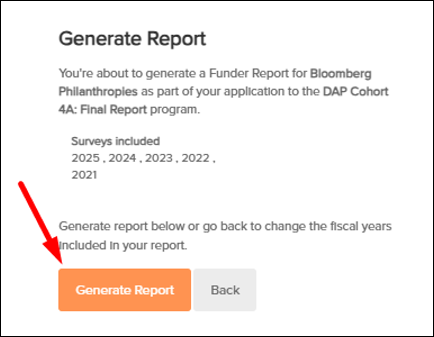
- Next will be a pop-up message confirming the surveys (CDPs) to be included in the Funder Report. This report will pull in multiple years of data with a minimum of one year and a maximum of five years. Click on Generate Report.
- You will receive a message indicating that your report is being generated. Reports generally take 1-5 minutes to run. Close the window to return to the Funder Reports and Grants page.
- Review the report and save a copy of the report for your records. Bloomberg Philanthropies will automatically get access to the report after it is generated, so no further action is needed.
For questions, call the SMU DataArts Support Center at 877-707-DATA (3282) or email: help@culturaldata.org. The Support Center is available from 11am to 5pm ET, Monday through Friday.